
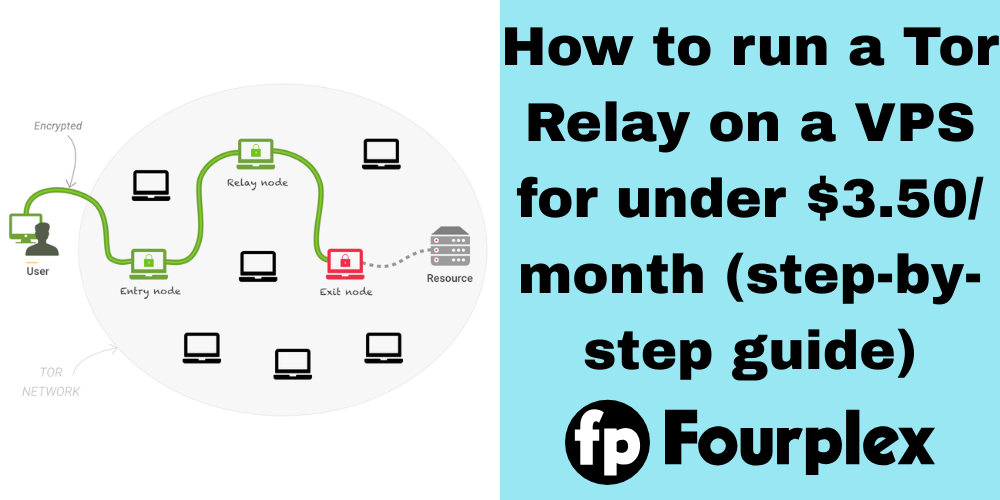
How to run a Tor Relay on a VPS for under $3.50/month: A step-by-step guide.
I have been running Tor relays for over a decade and ran middle, and bridge, relays located across the world. I currently run Tor exit relays on Fourplex.
Unlike other privacy solutions like commercial VPNs, Tor depends on volunteers running relay servers. This strengthens privacy by routing through three randomly selected servers hosted by thousands of volunteers. And you can set one up too.
Prerequisites
- Unmetered bandwidth or a high bandwidth limit on your VPS
- VPS providers (like Fourplex) must allow Tor
- A fresh AlmaLinux or Rocky Linux installation
Installation Instructions
- First, if your VPS doesn’t currently run AlmaLinux or Rocky Linux, you must install one of the two. I have a personal preference for Rocky, but some others prefer Alma. This can be installed in your provider’s control panel.
- Log into your server with SSH. This can be done by opening a terminal, and then typing in:
ssh root@IP
If your username isn’t root, replace it with your username and then run:sudo su - Update the server with:
dnf update -y - Open the
/etc/yum.repos.d/tor.repofile:nano /etc/yum.repos.d/tor.repo
If you use another text editor, replace nano with your editor of choice. - Insert the following:
[tor]
name=Tor for Enterprise Linux $releasever - $basearch
baseurl=https://rpm.torproject.org/centos/$releasever/$basearch
enabled=1
gpgcheck=1
gpgkey=https://rpm.torproject.org/centos/public_gpg.key
cost=100
Save the file. With nano, you can do Control-O, Enter, and then Control-X to save the file and close the editor. - Install Tor:
dnf update
dnf install -y tor - Remove the default Tor configuration:
rm -r /etc/tor/torrc - Edit the Tor configuration:
vim /etc/tor/torrc - If you’re running an exit relay, insert the following:
ORPort 9001
Log notice syslog
Nickname MyRelay
ContactInfo John Doe john.doe@gmail.com # REQUIRED for an exit relay
ExitRelay 1
IPv6Exit 1
RelayBandwidthRate 5000 KB
ExitPolicy accept *:53
ExitPolicy accept *:80
ExitPolicy accept *:443
ExitPolicy accept *:8080
ExitPolicy reject *:*
Keep in mind theExitPolicylines correspond to Fourplex’s required exit policy.
If you’re running a middle relay, insert the following:ORPort 9001
Log notice syslog
ContactInfo John Doe john.doe@gmail.com # OPTIONAL for a non-exit relay
Nickname MyRelay
RelayBandwidthRate 5000 KB
These lines mean the following:ORPort portis the TCP/IP port your Tor relay will listen onLog notice stdoutmeans we will log to systemdContactInfo emailis your email address and name or pseudonym. Exit relays require this due to malicious relays having been run anonymously in the past.Nickname nameis the name of your relay. It can be any alphanumeric string under 19 characters.ExitRelay 1means we are running an exit relay. Skipping this or usingExitRelay 0will run a non-exit relay.IPv6Exit 1means we are running an IPv6-capable exit relay. Skipping this or usingIPv6Exit 1will only allow exiting on IPv4. Setting this to1is recommended for exit relays.RelayBandwidthRate BANDWIDTH KBmeans we cap our relay atBANDWIDTHkilobytes per second (not kilobits).ExitPolicy accept *:portmeans we allow exiting on TCP/IP portport. In addition,ExitPolicy accept *:*we allow exiting on all TCP/IP ports. This is not recommended unless you have a reject line above it.ExitPolicy reject *:*means we disallow exiting on all other ports
In addition,ExitPolicy reject *:portmeans we disallow exiting on TCP/IP portport. - Save the file and close your editor.
- Allow the TCP/IP port port in the firewall:
firewall-cmd --zone=public --add-port=port/tcp
firewall-cmd --runtime-to-permanent
Replace port with the TCP/IP port specified in the torrc. - If you chose a port other than 9001, allow it in SELinux:
semanage port -a -t tor_port_t -p tcp port
Replace port with the TCP/IP port specified in the torrc. - You can now start Tor with:
systemctl start tor - Also, to automatically start Tor upon reboots, run:
systemctl enable --now tor - You can see the Tor status with:
journalctl -u tor -f
If you see log lines like:Jan 14 15:46:36 hostname tor[1142]: Jan 14 15:46:36.000 [notice] Self-testing indicates your ORPort A.B.C.D:9001 is reachable from the outside. Excellent. Publishing server descriptor.
This means the Tor relay is registered in Tor’s directory authority nodes. Keep in mind this log line will take about 5-20 minutes to appear, and it will take a few days for users to start using your relay.
Checking Relay Status
The website for checking a Tor relay’s status is https://metrics.torproject.org/rs.html.
It could take a few hours for your relay to be seen on this website after the above log line, but when it’s visible this shows your relay is registered.
Exit Relay Abuse
If you run an exit relay, from time-to-time abuse complaints may arise. If you use Fourplex for an exit relay with our required exit policy, we will resolve complaints on your behalf. Other hosts usually forward most abuse complaints.
The Tor Project has list of abuse complaint templates: https://community.torproject.org/relay/community-resources/tor-abuse-templates/
Conclusion
Operating Tor relays can be extremely fulfilling and exciting, but this isn’t an install-and-forget-it kind of thing . To ensure maximum privacy for Tor users, you need to be on top of software and security updates, and for exit relays, handle abuse complaints.
However, despite the occasional maintenance work, additional relays like the one you set up strengthens privacy for Tor users and increases the performance of the Tor network. Having run Tor relays for more than 11 years, I can vouch for how fulfilling and important this work is.
The Tor Project always welcomes new relays and volunteers to expand this vital network.